Computer Shortcuts QuickStudy Laminated Reference Guide Quick Study Computer
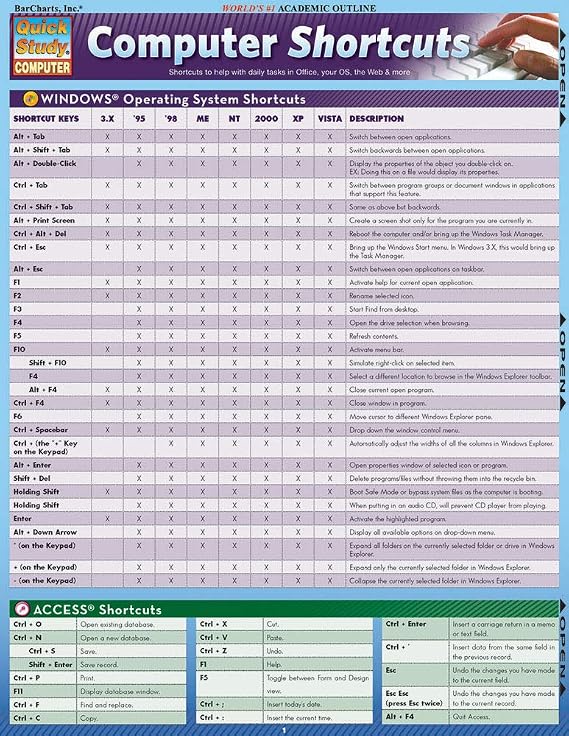
This 2-panel (4-page) guide points out helpful shortcuts that can be found within the most popular Windows PC and Apple Macintosh software.
Computer Shortcuts QuickStudy Laminated Reference Guide Quick Study Computer
Бр. на производ: 57413616

Computer Shortcuts QuickStudy Laminated Reference Guide Quick Study Computer

Бр. на производ: 57413616

MKD 685

Price Details

Excluding Shipping & Custom charges ( Shipping and custom charges will be calculated on checkout )

*All items will import from САД

На залиха
САД Увезено од продавницата USA

QTY:

Нарачајте сега и ќе се испорача околу Сабота, Јуни 27
Our Top Logistics Partners
  • fedex
  • dhl
This 2-panel (4-page) guide points out helpful shortcuts that can be found within the most popular Windows PC and Apple Macintosh software.
Гаранција U-Care:
Никој
Изберете план
fast shipping

Fast
Shipping

free return

Free
Return*

secure packaging

Secure Packaging

100% original products

100% Original Products

pci-dss

PCI DSS Compliance

iso certified

ISO 27001 Certified


paypal payment
visa payment
mastercard payment
Note: Step Down Voltage Transformer required for using electronics products of САД store (110-120). Recommended power converters Купи сега.

What Stands Out

Comprehensive Coverage
This guide includes an extensive list of computer shortcuts across various software, making it an essential tool for improving productivity and efficiency in both personal and professional settings.
Durable Material
Made from high-quality laminated material, this reference guide is resistant to wear and tear, ensuring longevity and protection against spills and stains for repeated use in busy environments.
Portable Design
The compact pamphlet format allows for easy transportation, making it convenient to reference while working on-the-go, ideal for students, professionals, or anyone looking to boost their computer skills.

Детали за производот

Find the best Computer Shortcuts Quick Study at Ubuy North Macedonia. Get quick access to essential computer shortcuts. Shop now and improve your productivity!
  • 2-panel (4-page) guide for saving time while using Windows PC and Apple Macintosh software
  • Points out helpful shortcuts for Windows Operating System, Access, FrontPage, PowerPoint, Publisher, QuarkXPress, InDesign, Quicken, UNIX/Linux, Internet Explorer, Mozilla Firefox, Opera, Apple Macintosh
  • Includes special character shortcuts for word processing
  • Useful for surfing the Web and balancing virtual checkbooks
  • Published in September 2008
  • Part of the Quick Study Computer Misc. Supplies series
Item Weight0.5 lbs (230 grams)

Who Should Buy?

Suitable For
  • Students

    Helpful for students learning computer software, providing quick reference to essential shortcuts for efficient study.

  • Office Workers

    Ideal for office professionals needing quick access to keyboard shortcuts to enhance productivity and streamline tasks.

  • Beginner Users

    Great for newcomers to computers, helping them quickly learn and memorize essential shortcut keys for various applications.

Not Suitable For
  • Advanced Users

    Not suitable for advanced users who already know shortcuts, may find it too basic and lacking in depth.

  • Graphical Designers

    Limited utility for graphic designers who require specialized shortcuts for design software beyond basic functionalities.

  • Casual Users

    Casual users may not benefit significantly; shortcuts could be overwhelming and not frequently needed for basic tasks.

ОПИС НА ПРОИЗВОД

Computer Shortcuts QuickStudy Laminated Reference Guide Quick Study Computer

Дали имате некое барање? Разговарајте со нас

Прашања и одговори на купувачи

  • Прашање: What are the benefits of using computer shortcuts?

    Одговор: Utilizing computer shortcuts significantly enhances your efficiency and productivity while working. Instead of navigating through multiple menus, you can execute commands with a simple keyboard combination, saving you time and effort. For instance, using 'Ctrl+C' to copy and 'Ctrl+V' to paste can streamline your workflow drastically. This is particularly useful for professionals who work with large datasets or need to manage numerous documents simultaneously.
  • Прашање: How can I learn computer shortcuts quickly?

    Одговор: Learning computer shortcuts can be done effectively through repeated practice and utilizing cheat sheets. A Quick Study guide can provide you with a comprehensive list of the most essential shortcuts tailored to your operating system. Regularly referencing these shortcuts while you work will help commit them to memory. For example, practicing the shortcuts for document formatting in word processors can vastly improve your document creation speed.
  • Прашање: Are computer shortcuts the same across different platforms?

    Одговор: No, computer shortcuts can vary significantly between operating systems and applications. For instance, 'Ctrl+Z' undoes an action on Windows, while 'Command+Z' does the same on macOS. Familiarizing yourself with the shortcuts specific to your frequently used software will enhance your effectiveness. This can have a major impact on your productivity, especially if you work in a mixed-platform environment.
  • Прашање: Which computer shortcuts are most useful for office work?

    Одговор: Some of the most useful shortcuts for office work include 'Ctrl+S' for saving documents, 'Alt+Tab' for switching between open applications, and 'Ctrl+A' to select all text. Knowing these shortcuts can accelerate your workflow and reduce the time spent on repetitive tasks. For instance, if your job involves frequent file management, mastering these shortcuts will make navigating between documents more efficient.
  • Прашање: How do I customize keyboard shortcuts on my computer?

    Одговор: Customizing keyboard shortcuts can usually be done through the settings or preferences menu of most software applications. This feature allows you to set your own combinations for specific tasks. For example, if you use certain commands frequently, personalizing shortcuts can enhance your workflow. A graphic designer might customize shortcuts in design software to speed up their creative process.
  • Прашање: Can computer shortcuts help with accessibility?

    Одговор: Absolutely, computer shortcuts can greatly improve accessibility for users with disabilities. Many shortcuts are designed to reduce reliance on a mouse, enabling users to navigate and interact with software more easily. For individuals with mobility restrictions, utilizing keyboard shortcuts can facilitate smoother operation of their devices, making technology more inclusive and user-friendly.
  • Прашање: How do I remember computer shortcuts longer-term?

    Одговор: To retain computer shortcuts long-term, consistent usage is key. Incorporating these shortcuts into your daily workflow will help embed them in your memory. Using mnemonic devices can also aid memorization. For instance, you might associate 'Ctrl+P' with 'Print' because both words start with 'P'. Regular practice in relevant contexts, like document creation, will reinforce your memory effectively.
  • Прашање: Where can I find a comprehensive list of computer shortcuts?

    Одговор: A Quick Study guide is an excellent resource for finding a comprehensive list of computer shortcuts. It condenses essential information into an easy-to-reference format, making it a perfect learning tool for users of all skill levels. Utilizing such a guide can help you quickly identify the most relevant shortcuts for your needs, enhancing your productivity during tasks.
  • Прашање: How do different software applications utilize shortcuts?

    Одговор: Different software applications have unique sets of shortcuts tailored to their functionalities. For example, word processors have shortcuts geared towards text formatting, while spreadsheet programs focus on data manipulation. Familiarizing yourself with these specialized shortcuts can help maximize your efficiency. In a data analysis role, knowing the shortcuts for navigating and manipulating data in spreadsheets can significantly speed up your analysis tasks.
  • Прашање: Where can I buy Computer Shortcuts Quick Study Computer Misc. Supplies?

    Одговор: You can purchase the Computer Shortcuts Quick Study guide from Ubuy in North Macedonia. Ubuy offers a variety of educational resources, including this guide, which is designed to help you enhance your computer skills by providing a concise summary of essential shortcuts.

QuickStudy Templates Editorial Review

Customer reviews for the Computer Shortcuts Quick Study Computer Misc. Supplies are mixed. While some customers find it to be a very useful and affordable product with good information, others find it to be outdated and not helpful at all. It is worth noting that some reviews mention that the product was last updated for windows VISTA 2007, which makes it quite old. However, others appreciate the convenient shortcut collection and find it handy to keep nearby. Overall, if you have an older Windows operating system and are looking for a quick reference guide to computer shortcuts, this product may be worth checking out. However, if you have a more recent operating system, it is probably best to find a more up-to-date resource.

Customer Reviews & Ratings

5.0
1 оцени од купувачи
  • 5 ѕвездичка
    100%
  • 4 ѕвездичка
    0%
  • 3 ѕвездичка
    0%
  • 2 ѕвездичка
    0%
  • 1 ѕвездичка
    0%

Рецензирајте го овој производ

Споделете го вашето мислење со другите купувачи

Добрите

  • Very affordable
  • Convenient shortcut collection
  • Handy to keep nearby
  • Good information for study

Конс

  • Outdated for newer Windows operating systems

Product Price History

Важни информации

  • Ограничувања: За меѓународно испорачаните производи, имајте предвид дека секоја гаранција од производителот не е важечка; опциите за услуги од производителот може да се недостапни; прирачниците за производите, упатствата и безбедносните предупредувања може да се на јазик различен од јазикот на одредишната држава; производите (и придружните материјали) може да не се дизајнирани според стандардите, спецификациите и правилата за означување на одредишната држава и производите може да не соодветствуваат со напонот и другите стандарди за електрика на одредишната држава (со што се наложува потребата од користење адаптер или претварач, доколку треба). Примателот е одговорен за проверка дали производот може законски да се увезе во одредишната држава. При нарачување од Ubuy или неговите партнери, примателот е евидентиран увозник и мора да ги почитува сите закони и регулативи на одредишната држава.
  • Некои од производите претставени на Ubuy не се за продажба, бидејќи Ubuy е глобален пребарувач. Производите подлежат на прописи за извоз/трговија.