- Почетна страница /
- Електроника /
- Computers, Laptops and Tablets /
- Software /
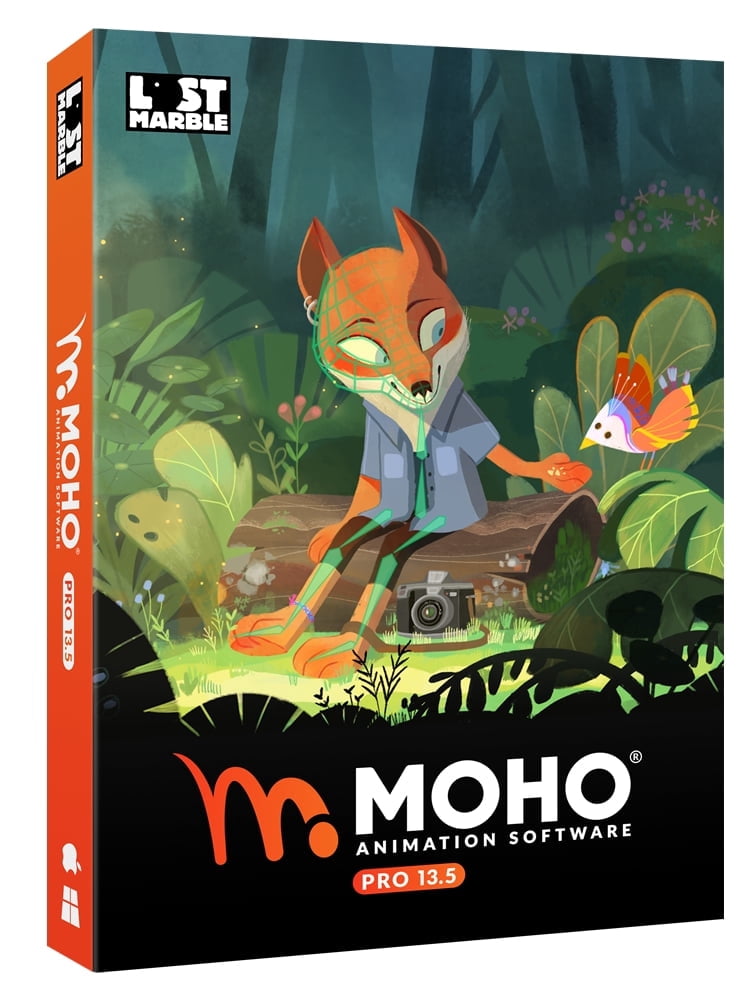
- MOHO PRO: 13.5 Computer Animation Software (PC Disc)
0 ratings







Бр. на производ:
53259032
MOHO PRO: 13.5 Computer Animation Software (PC Disc)
87% of respondents would recommend this to a friend
Бр. на производ:
53259032
MKD 9458
Price Details
Excluding Shipping & Custom charges ( Shipping and custom charges will be calculated on checkout )
*All items will import from САД
0 ratings
Напишете рецензија
На залиха
 Увезено од продавницата USA
QTY:
Има само уште 2 производ на залиха.
Нарачајте сега и ќе се испорача околу Sunday, Октомври 18
Secured transaction
Ubuy works hard to protect your security and privacy. Our advanced payment security system ensures confidentiality by encrypting your information during transmission using AES (Advanced Encryption Standards) and SSL (Secure Socket Layer) protocols. Your payment details are 100% secure as we do not share your payment details with third party sellers.
Our Top Logistics Partners


Fast
Shipping

Free
Return*

Secure Packaging

100% Original Products

PCI DSS Compliance

ISO 27001 Certified



Note: Step Down Voltage Transformer required for using electronics products of САД store (110-120). Recommended power converters Купи сега.


Детали за производот
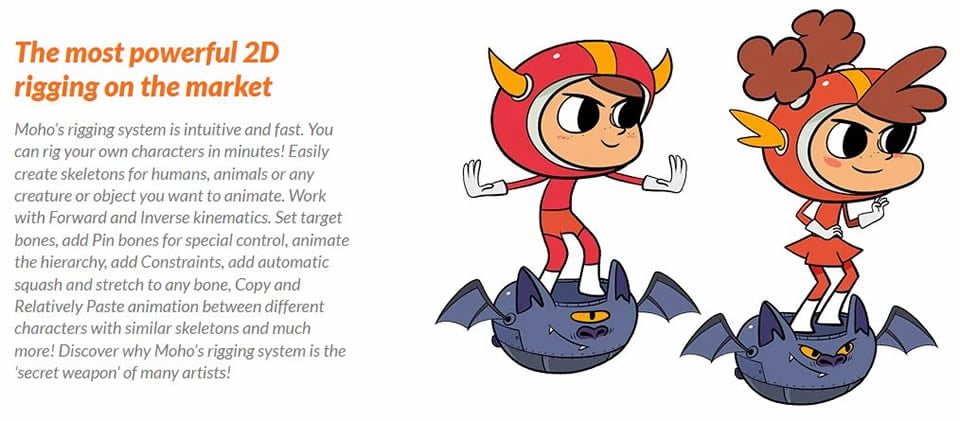
- Moho is a 2D animation software that provides professional, powerful and easy to use animation and rigging tools. Create your characters and scenes directly in Moho or import images and Photoshop files keeping the link and layering structure. Draw, rig and animate easily! ◆ The most powerful 2D rigging system Moho’s rigging system is intuitive and fast. You can rig your own characters in minutes! Easily create skeletons for humans, animals or any creature or object you want to animate. ◆ Drawing tools optimized for animation The unique vector system in Moho is optimized for animation and rigging, keeping the shapes always consistent while they move. Moho vector tools allow you to draw directly inside the software. ◆ Smart Bones Smart bones are a revolutionary way to make your characters behave exactly in the way you want. Your characters’ joints will bend with no distortions. You can also use Smart Bones as control levers to animate facial expressions, face rotations or even entire body turns! ◆ Vitruvian bones (New in Moho 13.5) Animating foreshortening and complex actions is easier than ever! Inspired by Da Vinci’s Vitruvian Man drawing, Vitruvian Bones are a new and powerful way to rig your characters. ◆ Photoshop files Import Create your illustrations in your favorite software: Photoshop, Clip Studio Paint, Procreate or any application you prefer, then save your art as PSD and import it in Moho. ◆ Quad meshes to animate exactly in the way you want! (New in Moho 13.5) Meshes are now even more powerful and easier to use with the new Quads! Animate your artwork in true perspective by simply attaching a four points shape to it. Or create grids for your characters -combining triangles and quads- and make them move like 3D. ◆ Automate your animation with Physics, Particles, Dynamics Quickly create complex realistic animation! Transform your scene in a gravity playground with the Physics engine, just hit play and see how the objects and characters bounce and react to each other’s movement. ◆ Add life to your scenes with the new Wind dynamics! (New in Moho 13.5) Wind is the newest addition to the powerful and easy to use Physics toolset Moho offers! Take absolute control over the strength, direction and turbulence of wind and make your scenes come alive in minutes. ◆ Take full control of your animation with the Timeline, Graph mode and multiple interpolation modes Control every detail of your animation with Moho deep and easy to use Timeline. Set the interpolation mode to achieve exactly the timing you want, Smooth, Step, Easy In/Out and many more. ◆ Full 3D space and camera Use Moho’s 3D workspace to place and rotate your layers in it. Then move the camera around to easily achieve a multiplane effect. Have total control on how your layers look with the option to automatically keep the visual size on the layers you move in 3D. Import 3D objects from your favorite software or create basic elements directly in Moho with the Extrusion, Inflate and Lathe options for vector layers. ◆ Lip sync tools Easily create your lipsync with Switch layers and the Switch selection window. Animating Lip Sync is quick and precise. Complement your work with Papagayo -an open source software also created by Lost Marble- to automate the Lip Sync animation. ◆ FBX Support for Unity™ Game Developers Unity™ game developers and users can use FBX support of animated 2D content in Moho Pro, eliminating the need to create rigid sprites for game development and providing the ability to get the exact look and feel that they want. ◆ Personalize your experience with Scripting Write your own tools, modify the existing ones or check what other users have done. There are hundreds of powerful tools and improvements created by the community. Make Moho work exactly in the way you want!
| Operating System | PC and Mac OS |
| Brand | Moho |
| Physical Media Format | Key Card Format |
| Version | 13.5 |
| Model | MOHOPRO135ENFULP |
| Languages Supported | English |
| Educational Focus | Technology |
| Has Written Warranty | No |
| Item Weight | 0.5 lbs (230 grams) |
ОПИС НА ПРОИЗВОД
MOHO PRO: 13.5 Computer Animation Software (PC Disc)
Дали имате некое барање? Разговарајте со нас
Прашања и одговори на клиентите
-
Прашање:
Како да купувате MOHO PRO: 13.5 Computer Animation Software (PC Disc) онлајн од Ubuy?
Одговор: Лесно е да се купува MOHO PRO: 13.5 Computer Animation Software (PC Disc) онлајн од Ubuy.. Треба само да го пребарувате производот, да го изберете вашиот начин на испорака додека се одјавувате и да го доставите до вашата локација. -
Прашање:
Дали MOHO PRO: 13.5 Computer Animation Software (PC Disc) е достапен за онлајн купување во North Macedonia?
Одговор: Да, во Ubuy North Macedonia овој производ е достапен за да купувате по разумна цена.. MOHO PRO: 13.5 Computer Animation Software (PC Disc) не е достапен локално, но можете да ни верувате во нашите услуги за брза испорака. -
Прашање:
Колку време е потребно за да се добие производ по поставувањето на нарачката?
Одговор: Времето на испорака на нарачаниот производ варира во зависност од тоа што сте го нарачале и начинот на испорака што сте го избрале.. Проценетото време за испорака се споменува при процесот на наплата, затоа бидете безгрижни додека купувате.
Moho Software Editorial Review
Не се пронајдени уреднички критики
Customer Reviews & Ratings
4 оцени од купувачи
-
5 ѕвездичка
100%
-
4 ѕвездичка
0%
-
3 ѕвездичка
0%
-
2 ѕвездичка
0%
-
1 ѕвездичка
0%
Рецензирајте го овој производ
Споделете го вашето мислење со другите купувачи
Product Price History
Важни информации
- Ограничувања: За меѓународно испорачаните производи, имајте предвид дека секоја гаранција од производителот не е важечка; опциите за услуги од производителот може да се недостапни; прирачниците за производите, упатствата и безбедносните предупредувања може да се на јазик различен од јазикот на одредишната држава; производите (и придружните материјали) може да не се дизајнирани според стандардите, спецификациите и правилата за означување на одредишната држава и производите може да не соодветствуваат со напонот и другите стандарди за електрика на одредишната држава (со што се наложува потребата од користење адаптер или претварач, доколку треба). Примателот е одговорен за проверка дали производот може законски да се увезе во одредишната држава. При нарачување од Ubuy или неговите партнери, примателот е евидентиран увозник и мора да ги почитува сите закони и регулативи на одредишната држава.
- Некои од производите претставени на Ubuy не се за продажба, бидејќи Ubuy е глобален пребарувач. Производите подлежат на прописи за извоз/трговија.
MKD 9458
Нарачајте сега и ќе се испорача околу Sunday, Октомври 18
This item is not restrict in my country.(Please click on above link if this item is not restrict in your country, So our team will review and allow.)
QTY:
Има само уште 2 производ на залиха.
Secured transaction
PCI DSS compliant and ISO 27001:2022 certified, with encrypted payments and full buyer protection on every order.
Our Top Logistics Partners
Fastest cross-border delivery
Ubuy Assurance
Experience worry-free shopping with 100% original products, PCI DSS-compliant payment security, ISO 27001-certified data protection, the fastest cross-border delivery, free returns *, and secure packaging on every order.