0 ratings


Бр. на производ:
88660852
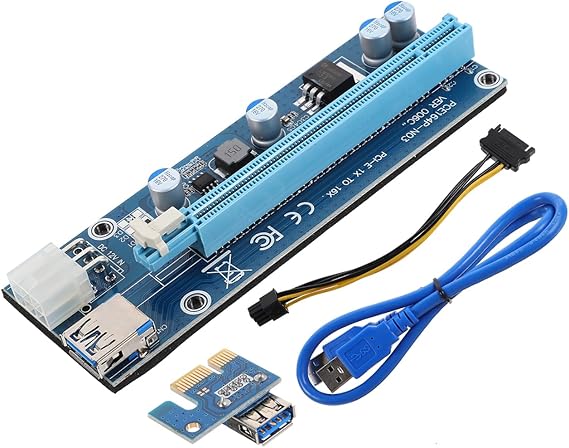
Graphics Card Adapter Cable Pcie 3.0 Riser Card External Gpu Extension for Laptop Gaming Multimedia Upgrade with USB Cable 5.03X1.77X0.78 Inches
Бр. на производ:
88660852
MKD 1931
Price Details
Excluding Shipping & Custom charges ( Shipping and custom charges will be calculated on checkout )
*All items will import from САД
0 ratings
Напишете рецензија
На залиха
 Увезено од продавницата USA
Нарачајте сега и ќе се испорача околу Среда, Јули 08
Secured transaction
Ubuy works hard to protect your security and privacy. Our advanced payment security system ensures confidentiality by encrypting your information during transmission using AES (Advanced Encryption Standards) and SSL (Secure Socket Layer) protocols. Your payment details are 100% secure as we do not share your payment details with third party sellers.
Our Top Logistics Partners


Upgrade your laptop's gaming and multimedia capabilities with the Mini Graphics Card.

Fast
Shipping

Free
Return*

Secure Packaging

100% Original Products

PCI DSS Compliance

ISO 27001 Certified


Note: Step Down Voltage Transformer required for using electronics products of САД store (110-120). Recommended power converters Купи сега.


What Stands Out
Enhanced Graphics Performance
Significantly boost your laptop's graphics capabilities with this external GPU, perfect for gaming, video editing, and graphic design.
Plug-and-Play Compatibility
Easily connect the external graphics card to your laptop without complex installations, making it user-friendly for all experience levels.
Versatile Connectivity
Provides multiple connection options for different devices, ensuring maximum flexibility in use and compatibility with various laptops.
Детали за производот
| Item Weight | 3 lbs (1.36 kg) |
Who Should Buy?

-
Gaming Enthusiasts
Gamers looking for enhanced graphics performance without upgrading their entire laptop will greatly benefit from this product.
-
Creative Professionals
Graphic designers and video editors requiring powerful rendering capabilities can significantly improve efficiency with this external GPU.
-
Frequent Travelers
Users who need a portable solution for graphics-heavy tasks can appreciate the convenience of an external graphics card.

-
Casual Users
Individuals who utilize their laptops for basic tasks like browsing or document editing may find this product unnecessary.
-
Outdated Laptops
Older laptop models lacking appropriate ports and compatibility may not benefit from using an external graphics card.
-
Budget-Conscious Buyers
Users on a tight budget may find the total costs too high when factoring in the GPU and accessories needed.
ОПИС НА ПРОИЗВОД
Graphics Card Adapter Cable Pcie 3.0 Riser Card External Gpu Extension for Laptop Gaming Multimedia Upgrade with USB Cable 5.03X1.77X0.78 Inches
Дали имате некое барање? Разговарајте со нас
Прашања и одговори на купувачи
-
Прашање:
What is an external GPU for a laptop?
Одговор: An external GPU (eGPU) is a device that allows you to enhance your laptop's graphics processing power by connecting an external graphics card through a port like USB or Thunderbolt. This technology is particularly beneficial for gamers or visual professionals who require superior rendering capabilities. eGPUs help laptops handle more demanding applications and games, significantly improving frame rates and overall performance. They are especially useful for multimedia tasks, 3D modeling, and video editing, making your laptop a versatile platform for high-performance tasks. -
Прашање:
How do I connect an external GPU to my laptop?
Одговор: Connecting an external GPU to your laptop typically involves using a USB cable or a Thunderbolt port. First, ensure that your laptop's OS supports eGPU connectivity. After plugging in the eGPU, you might need to install specific drivers or software to recognize the external graphics card. Once set up, restart your laptop to enable the eGPU. This setup allows you to leverage the power of a dedicated graphics card while using your laptop for gaming or multimedia applications, unlocking advanced graphics performance for your favorite titles or software. -
Прашање:
What are the benefits of using an external GPU for gaming?
Одговор: Using an external GPU for gaming significantly enhances your laptop's graphical capabilities, providing smoother visuals and higher frame rates. This is especially important for demanding games that require robust hardware. An eGPU not only enables you to play the latest titles at better settings but also extends your laptop's lifespan by allowing you to upgrade your graphics hardware over time. With the eGPU, you can achieve desktop-level performance on a portable device, ideal for gamers on the go who don't want to compromise on visual quality. -
Прашање:
Can I use an external GPU for tasks other than gaming?
Одговор: Yes, external GPUs are versatile and can be used for various applications beyond gaming. They significantly enhance graphic-intensive tasks like video editing, 3D rendering, and graphic design, providing faster processing and rendering speeds. This means professionals in creative fields can achieve more efficient workflows and improved performance when using software such as Adobe Premiere Pro, AutoCAD, or Blender. Using an eGPU can also improve multitasking by offloading graphic processing from the CPU, ensuring a smoother overall computing experience. -
Прашање:
What laptops are compatible with external GPUs?
Одговор: Most modern laptops with USB-C or Thunderbolt ports are compatible with external GPUs. Before purchasing, it is crucial to check if your laptop supports eGPU connectivity through its specifications or user manual. Some gaming and high-performance laptops are designed with eGPU support in mind, allowing for significant upgrades in graphics capabilities. For users seeking to maximize graphics performance, ensure that your laptop can adequately handle the power requirements of the external GPU you choose. -
Прашање:
Does an external GPU work with all USB connections?
Одговор: No, not all USB connections are suitable for external GPUs. While USB-C and Thunderbolt 3 or 4 ports can effectively support eGPUs, traditional USB-A ports do not have sufficient bandwidth for the high data transfer rates required for gaming or heavy graphical tasks. It's essential to verify that your laptop has the appropriate port and supports the required protocols to take advantage of the enhanced performance an external GPU provides. -
Прашање:
What specifications should I look for in an external GPU?
Одговор: When selecting an external GPU, consider several specifications that can impact performance, including the GPU model, memory size (VRAM), and compatibility with your laptop's connection type. A high-end model with dedicated VRAM will offer better performance for gaming and graphic-intensive tasks. Additionally, check the power requirements and whether the eGPU comes with its own power supply. Ensure it has good cooling solutions to maintain performance during intensive use. These considerations will help you choose an eGPU that meets your gaming or professional needs. -
Прашање:
Can I use multiple external GPUs with my laptop?
Одговор: Typically, most laptops support only a single external GPU connection due to bandwidth limitations of the ports. However, some advanced systems and setups allow for multi-GPU configurations, though they require specific hardware and driver support. This is ideal for users seeking to maximize graphics performance for specialized applications like deep learning or high-end gaming. Always check compatibility with your laptop's technical specifications and the eGPU system requirements before attempting to set up multiple external GPUs. -
Прашање:
How does an external GPU impact battery life?
Одговор: Using an external GPU can lead to increased power consumption, meaning it may impact your laptop's battery life when not plugged in. The dedicated graphics card in the eGPU requires more energy than built-in graphics solutions. While connected to a power source, the eGPU will enhance performance significantly, but on battery power, you may experience shorter usage times. If you're frequently utilizing high-performance tasks while on the go, consider investing in a robust battery or using your laptop plugged in for optimal performance. -
Прашање:
Where can I buy an External GPU for Laptop Adapter Card with USB Cable Enhance Graphics Power Expandability for Gaming and Multimedia?
Одговор: You can buy an External GPU for Laptop Adapter Card with USB Cable on Ubuy. This platform offers a variety of options suitable for enhancing laptop graphic capabilities. With Ubuy, you can explore different brands and specifications, ensuring you find the right eGPU that aligns with your gaming and multimedia needs specifically in North Macedonia.
MOLUCKFU Graphics Cards Editorial Review
Не се пронајдени уреднички критики
Customer Reviews & Ratings
1 оцени од купувачи
-
5 ѕвездичка
100%
-
4 ѕвездичка
0%
-
3 ѕвездичка
0%
-
2 ѕвездичка
0%
-
1 ѕвездичка
0%
Рецензирајте го овој производ
Споделете го вашето мислење со другите купувачи
Добрите
- Enhanced graphics performance
- Supports high resolutions
- Improves gaming experience
- Easy installation
- Compatible with multiple systems
Конс
- Requires external power
Platform Trust & Buyer Confidence

MT
Mohd
Verified buyer
“The product received very good packaging & safe…Thank You”
16 June 2026 · via Trustpilot
SJ
Shawati
Verified buyer
“Accurate delivery timing given”
16 June 2026 · via Trustpilot
YB
Youcef
Verified buyer
“Not madly expensive like I thought, and much quicker than promised.”
15 June 2026 · via Trustpilot
LM
Leila
Verified buyer
“Never dealt with Ubuy before, but everything worked out great. Seamless cross border purchasing and shipping. Thanks!”
6/7/2026 · via Trustpilot
KA
Kwame
Verified buyer
“The process was smooth, with clear communication and timelines. This was my 1st purchase and I am really impressed. I will definitely be coming back.”
12 June 2026 · via Trustpilot
Безбедна страница за плаќање
Global Delivery
Easy Returns
Genuine Products
Product Price History
Важни информации
- Ограничувања: За меѓународно испорачаните производи, имајте предвид дека секоја гаранција од производителот не е важечка; опциите за услуги од производителот може да се недостапни; прирачниците за производите, упатствата и безбедносните предупредувања може да се на јазик различен од јазикот на одредишната држава; производите (и придружните материјали) може да не се дизајнирани според стандардите, спецификациите и правилата за означување на одредишната држава и производите може да не соодветствуваат со напонот и другите стандарди за електрика на одредишната држава (со што се наложува потребата од користење адаптер или претварач, доколку треба). Примателот е одговорен за проверка дали производот може законски да се увезе во одредишната држава. При нарачување од Ubuy или неговите партнери, примателот е евидентиран увозник и мора да ги почитува сите закони и регулативи на одредишната држава.
- Некои од производите претставени на Ubuy не се за продажба, бидејќи Ubuy е глобален пребарувач. Производите подлежат на прописи за извоз/трговија.
MKD 1931
Нарачајте сега и ќе се испорача околу Среда, Јули 08
This item is not restrict in my country.(Please click on above link if this item is not restrict in your country, So our team will review and allow.)
QTY:
Secured transaction
Ubuy works hard to protect your security and privacy. Our advanced payment security system ensures confidentiality by encrypting your information during transmission using AES (Advanced Encryption Standards) and SSL (Secure Socket Layer) protocols. Your payment details are 100% secure as we do not share your payment details with third party sellers.
Our Top Logistics Partners
Fastest cross-border delivery
Карактеристики и придобивки
- Elevates gaming and multimedia experience on laptops.
- Quick and easy connection to external monitors and peripherals.
- Convenient solution for expanding laptop capabilities.
- Enhances graphics processing power for improved performance.
- Ideal for gamers and multimedia enthusiasts.
- Seamless and immersive visual effects for enhanced experience.